Created page with "<br> For 14 days we provide users with a free Professional plan trial. <br><br> To start your trial navigate to the <span style="background-color:#d4f8e5; padding:5px; border..." |
No edit summary |
||
| Line 3: | Line 3: | ||
<br><br> | <br><br> | ||
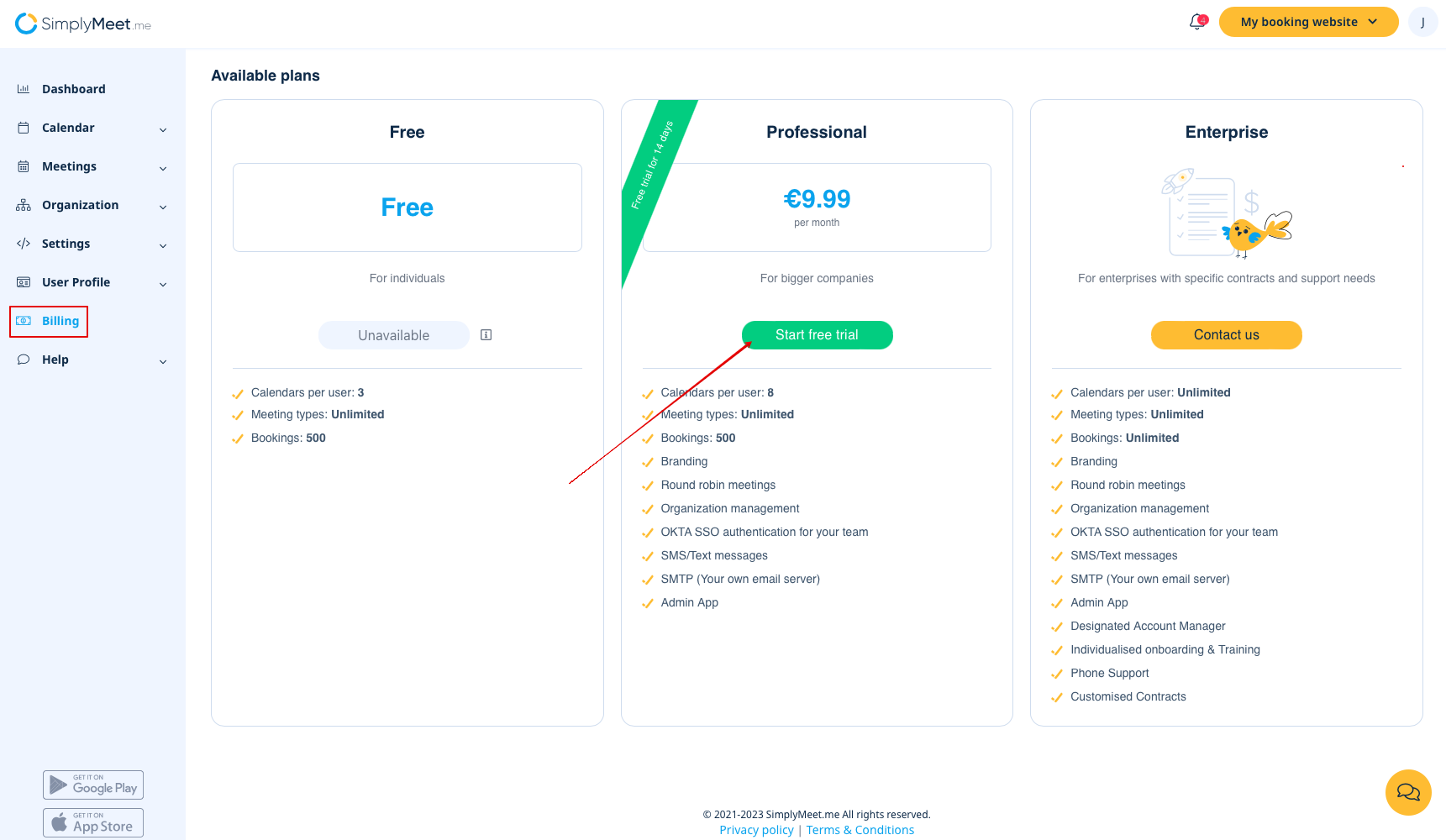
To start your trial navigate to the <span style="background-color:#d4f8e5; padding:5px; border-radius:5px;">Billing</span> tab and where you see <span style="background-color:#d4f8e5; padding:5px; border-radius:5px;">Professional</span> Free trial for 14 days click <span style="background-color:#d4f8e5; padding:5px; border-radius:5px;">Start free trial.</span> | To start your trial navigate to the <span style="background-color:#d4f8e5; padding:5px; border-radius:5px;">Billing</span> tab and where you see <span style="background-color:#d4f8e5; padding:5px; border-radius:5px;">Professional</span> Free trial for 14 days click <span style="background-color:#d4f8e5; padding:5px; border-radius:5px;">Start free trial.</span> | ||
[[File:Sm start free trial path.png|1200px|center|link=https://help.simplymeet.me/images/1/1a/Sm_start_free_trial_path.png]] | |||
<br><br> | <br><br> | ||
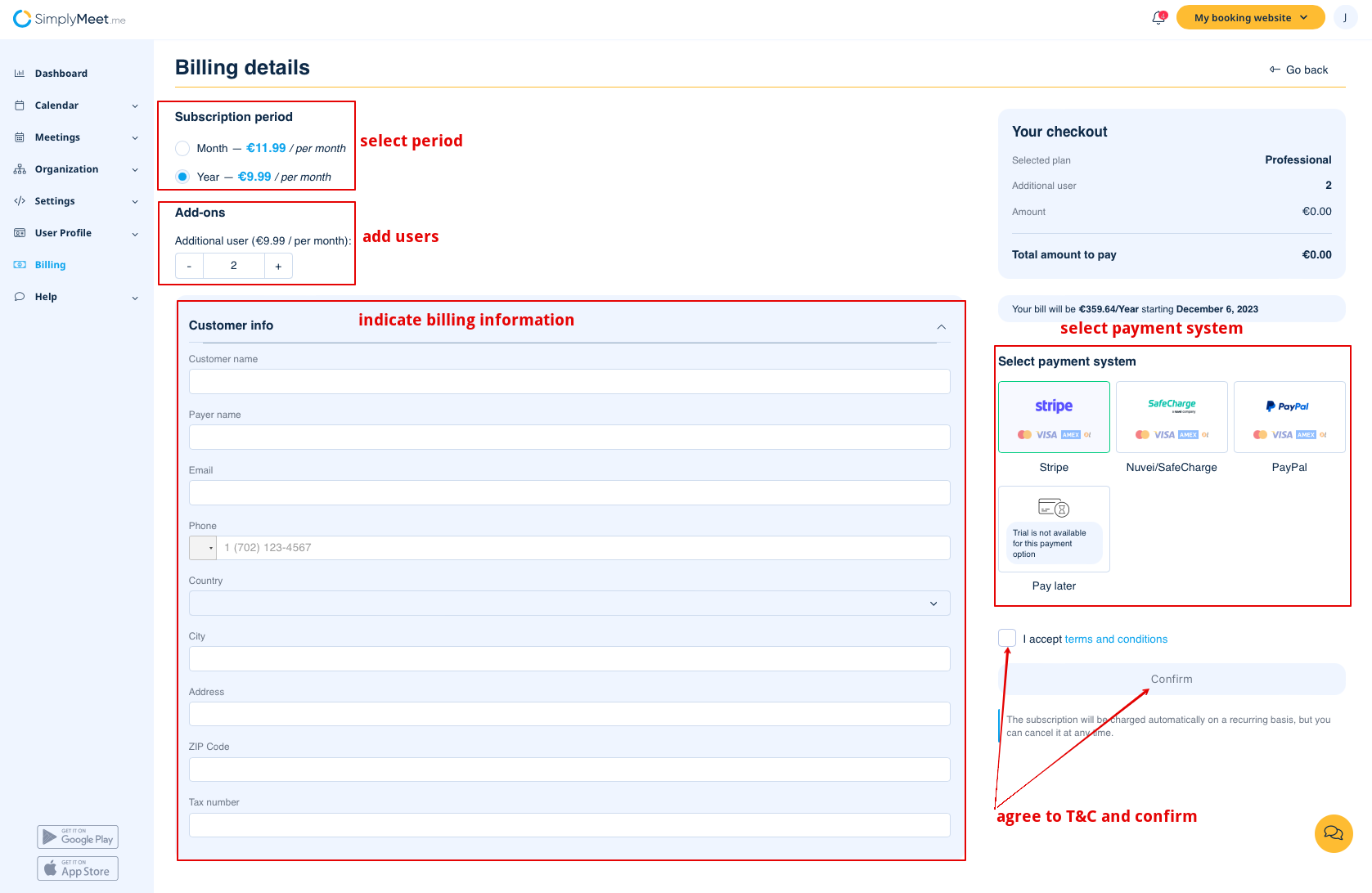
The system will take you to the <span style="background-color:#d4f8e5; padding:5px; border-radius:5px;">Billing details</span> where you will be able to select the desired subscription period (month/year), as well as specify the number of users you require in addition in <span style="background-color:#d4f8e5; padding:5px; border-radius:5px;">Add-ons</span> -> <span style="background-color:#d4f8e5; padding:5px; border-radius:5px;">Additional user</span>.<br> | The system will take you to the <span style="background-color:#d4f8e5; padding:5px; border-radius:5px;">Billing details</span> where you will be able to select the desired subscription period (month/year), as well as specify the number of users you require in addition in <span style="background-color:#d4f8e5; padding:5px; border-radius:5px;">Add-ons</span> -> <span style="background-color:#d4f8e5; padding:5px; border-radius:5px;">Additional user</span>.<br> | ||
| Line 9: | Line 10: | ||
In the <span style="background-color:#d4f8e5; padding:5px; border-radius:5px;">Select payment system</span> choose the preferable payment method and confirm your trial.<br> | In the <span style="background-color:#d4f8e5; padding:5px; border-radius:5px;">Select payment system</span> choose the preferable payment method and confirm your trial.<br> | ||
You will not be charged right away, the first payment will be taken automatically once 14-day trial ends. | You will not be charged right away, the first payment will be taken automatically once 14-day trial ends. | ||
[[File:Sm billing details fill in.png|1200px|center|link=https://help.simplymeet.me/images/f/f6/Sm_billing_details_fill_in.png]] | |||
<br><br> | <br><br> | ||
If you wish to not continue using this subscription after your free trial, go to <span style="background-color:#d4f8e5; padding:5px; border-radius:5px;">Your next bill</span> section inside the <span style="background-color:#d4f8e5; padding:5px; border-radius:5px;">Billing</span> tab and click to cancel your recurring payment. | If you wish to not continue using this subscription after your free trial, go to <span style="background-color:#d4f8e5; padding:5px; border-radius:5px;">Your next bill</span> section inside the <span style="background-color:#d4f8e5; padding:5px; border-radius:5px;">Billing</span> tab and click to cancel your recurring payment. | ||
<br><br> | <br><br> | ||
Revision as of 10:46, 23 November 2023
For 14 days we provide users with a free Professional plan trial.
To start your trial navigate to the Billing tab and where you see Professional Free trial for 14 days click Start free trial.
The system will take you to the Billing details where you will be able to select the desired subscription period (month/year), as well as specify the number of users you require in addition in Add-ons -> Additional user.
You can also edit billing details in Customer info block if needed.
In the Select payment system choose the preferable payment method and confirm your trial.
You will not be charged right away, the first payment will be taken automatically once 14-day trial ends.
If you wish to not continue using this subscription after your free trial, go to Your next bill section inside the Billing tab and click to cancel your recurring payment.
