From SimplyMeet.me
No edit summary |
No edit summary |
||
| Line 3: | Line 3: | ||
</p> | </p> | ||
<p class="intercom-align-left"> | <p class="intercom-align-left"> | ||
If you don't want to show SimplyMeet.me branding in your email notifications or on the scheduling page, you have to disable the SimplyMeet.me branding which is enabled by default. | If you don't want to show SimplyMeet.me branding in your email notifications or on the scheduling page, you have to disable the SimplyMeet.me branding toggle which is enabled by default. | ||
</p> | </p> | ||
<ol> | <ol> | ||
Revision as of 15:43, 22 July 2026
Note! Available with paid plan only
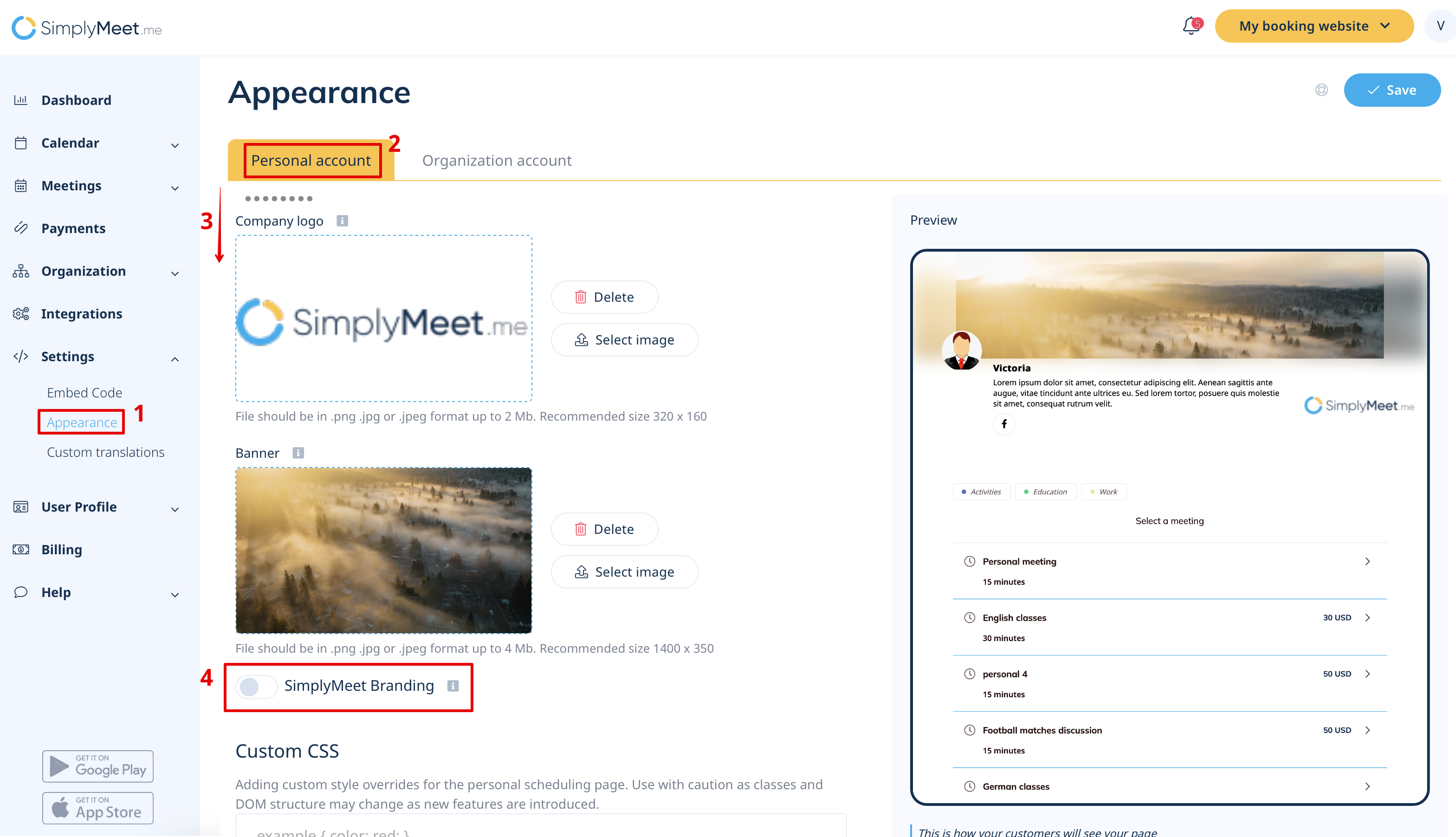
If you don't want to show SimplyMeet.me branding in your email notifications or on the scheduling page, you have to disable the SimplyMeet.me branding toggle which is enabled by default.
- Go to Appearance.
- Choose "Personal account" tab and scroll the page down.
- Disable SimplyMeet.me Branding.
- Click Save button.