Created page with "Collective Meeting type functionality is designed to facilitate meetings involving multiple team members simultaneously.<br> '''Note:''' It is available for organization leve..." |
No edit summary |
||
| (4 intermediate revisions by the same user not shown) | |||
| Line 8: | Line 8: | ||
*and troubleshooting sessions that require the presence of multiple individuals, such as support agents and engineers. | *and troubleshooting sessions that require the presence of multiple individuals, such as support agents and engineers. | ||
<br> | <br> | ||
<p> | |||
'''Video tutorial''' [[File:Youtube-Logo.png|link=https://www.youtube.com/watch?v=xCjWDgJp1-M]] | |||
</p> | |||
'''Note:''' Collective meetings are always secret, and this option cannot be disabled. | '''Note:''' Collective meetings are always secret, and this option cannot be disabled. | ||
| Line 29: | Line 33: | ||
[[File:View the list of collective meeting types.png|1200px|border|center|link=https://help.simplymeet.me/images/4/46/View_the_list_of_collective_meeting_types.png]] | [[File:View the list of collective meeting types.png|1200px|border|center|link=https://help.simplymeet.me/images/4/46/View_the_list_of_collective_meeting_types.png]] | ||
: | :4. Fill in the form with the meeting type details: add meeting type name, description if necessary, select duration, add users that will be booked for this meeting type, set availability and adjust any other available settings. | ||
: | :5. Save the meeting type when finished. | ||
: | :6. Send the link to this meeting type or share the timeslots via email with the people to book.<br> | ||
:(Meetings booked as part of a team will show a corresponding visual badge in meeting details within the SimplyMeet.me Calendar tab) | |||
[[File:Share collective meeting type.png|1200px|border|center|link=https://help.simplymeet.me/images/d/d5/Share_collective_meeting_type.png]] | [[File:Share collective meeting type.png|1200px|border|center|link=https://help.simplymeet.me/images/d/d5/Share_collective_meeting_type.png]] | ||
<br><br> | <br><br> | ||
Latest revision as of 13:03, 5 August 2025
Collective Meeting type functionality is designed to facilitate meetings involving multiple team members simultaneously.
Note: It is available for organization level and paid subscription only.
It is particularly useful for scenarios such as:
- panel interviews,
- product discovery calls,
- and troubleshooting sessions that require the presence of multiple individuals, such as support agents and engineers.
Video tutorial 
Note: Collective meetings are always secret, and this option cannot be disabled.
Collective Meeting type will only display time slots on the booking page when all connected to it users are available to attend the meeting.
It ensures that all participants can join the meeting without any scheduling conflicts.
If any team member is unavailable while others are free, that particular time slot will not be shown as an available option.
All users involved are automatically added to the calendar event.
This simplifies the process of organizing the meeting and ensures that all relevant participants are included in the event.
- How to use
- 1. Navigate to your Meeting types page.
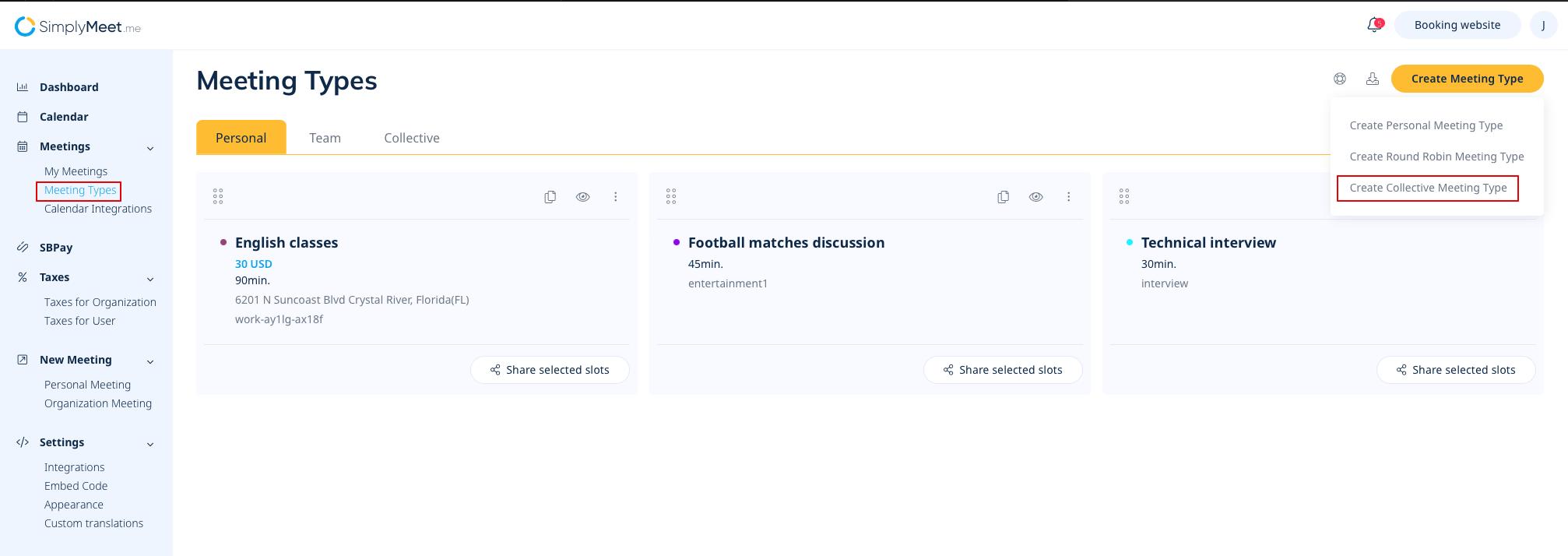
- 2. To add a new one please click on Create Meeting type on the top right and select Create Collective Meeting Type from the options.
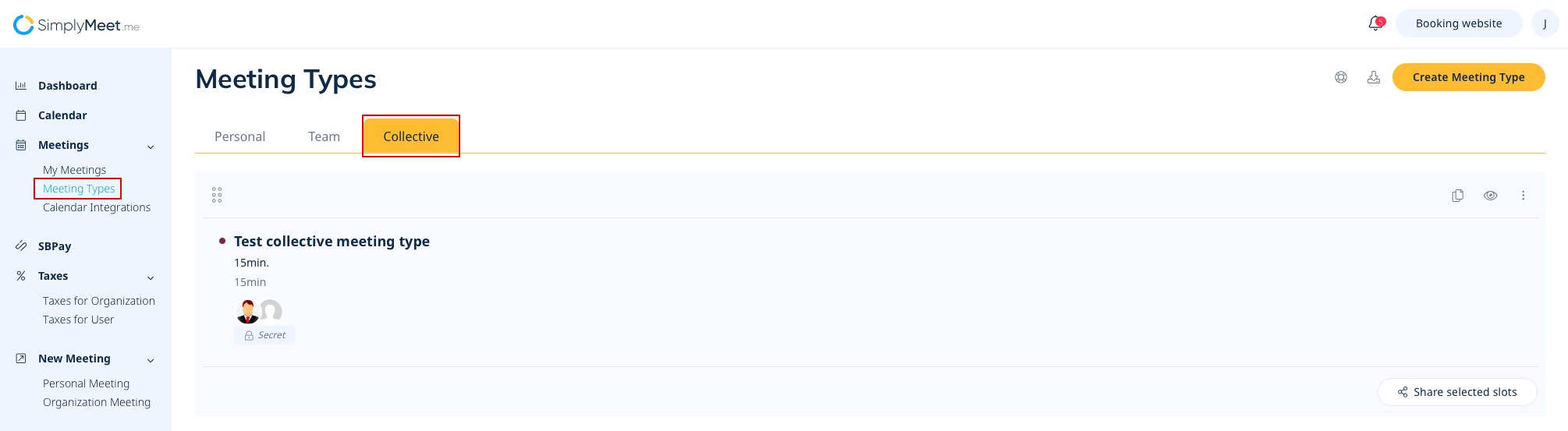
- 3. If you already have such meeting types and need to edit some of them please select Collective tab on your Meeting types page and click on the desired meeting type to proceed with editing.
- 4. Fill in the form with the meeting type details: add meeting type name, description if necessary, select duration, add users that will be booked for this meeting type, set availability and adjust any other available settings.
- 5. Save the meeting type when finished.
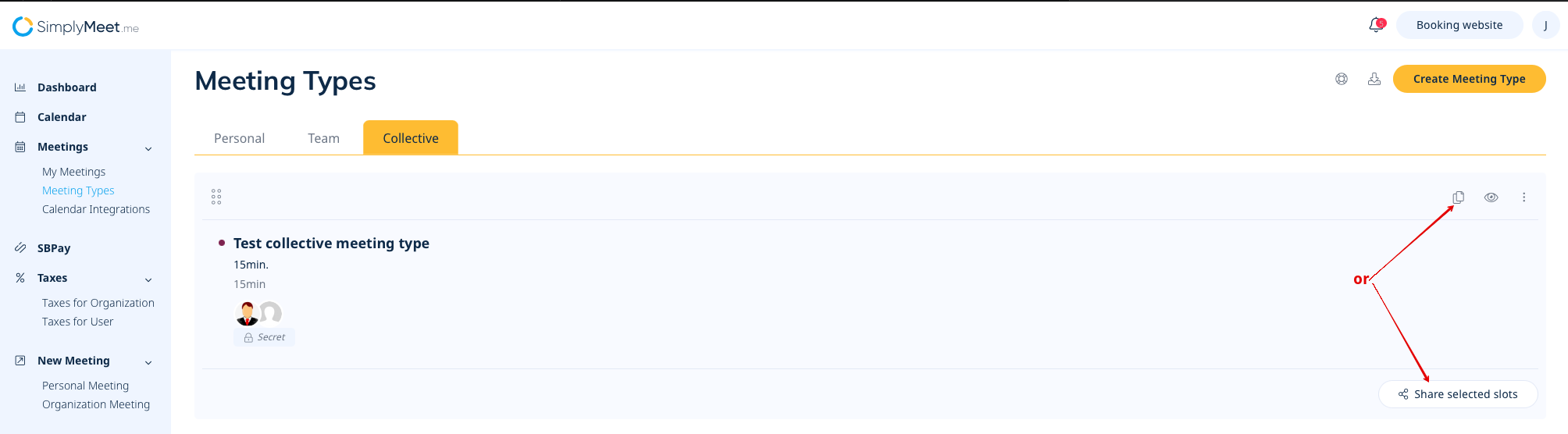
- 6. Send the link to this meeting type or share the timeslots via email with the people to book.
- (Meetings booked as part of a team will show a corresponding visual badge in meeting details within the SimplyMeet.me Calendar tab)