From SimplyMeet.me
No edit summary |
No edit summary |
||
| (3 intermediate revisions by the same user not shown) | |||
| Line 1: | Line 1: | ||
<p class="intercom-align-left"> | <p class="intercom-align-left"> | ||
If you don't want to show SimplyMeet.me | '''Note!''' Available with paid plan only | ||
</p> | |||
<p class="intercom-align-left"> | |||
If you don't want to show SimplyMeet.me branding in your email notifications or on the scheduling page, you have to disable the SimplyMeet.me branding which is enabled by default. | |||
</p> | </p> | ||
<ol> | <ol> | ||
<li>Go to [https:// | <li>Go to [https://secure.simplymeet.me/panel/appearance Appearance].</li> | ||
<li>Choose "Personal account" tab and scroll the page down.</li> | |||
<li>Disable <strong>SimplyMeet.me Branding.</strong> </li> | <li>Disable <strong>SimplyMeet.me Branding.</strong> </li> | ||
<li>Click <strong>Save</strong> button.</li> | <li>Click <strong>Save</strong> button.</li> | ||
</ol> | </ol> | ||
<div class="intercom-container intercom-align-center"> | <div class="intercom-container intercom-align-center"> | ||
[[File: | [[File:Sm disable branding new.png|1200px|center|link=https://help.simplymeet.me/images/3/3f/Sm_disable_branding_new.png]] | ||
Latest revision as of 10:54, 19 April 2024
Note! Available with paid plan only
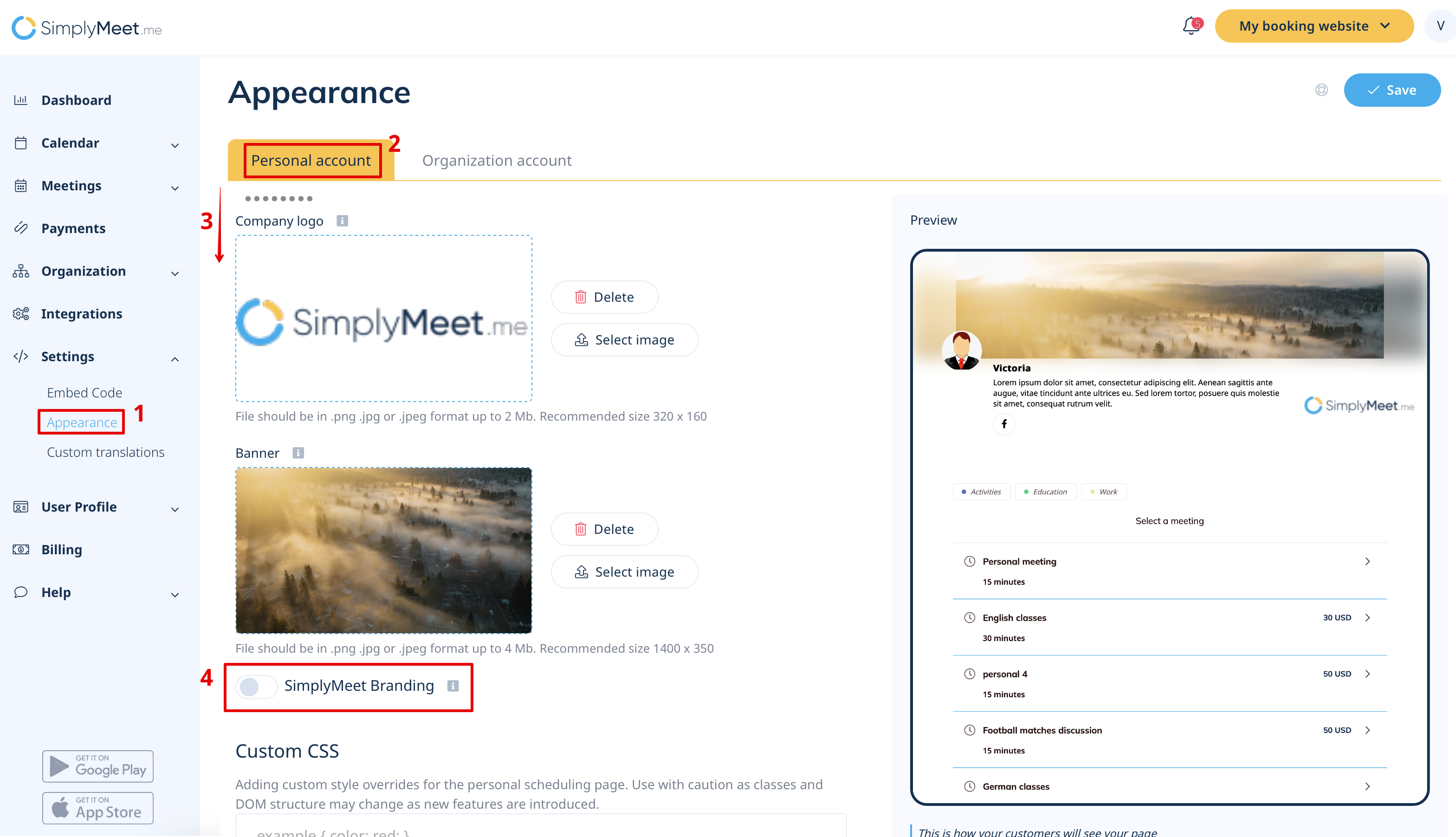
If you don't want to show SimplyMeet.me branding in your email notifications or on the scheduling page, you have to disable the SimplyMeet.me branding which is enabled by default.
- Go to Appearance.
- Choose "Personal account" tab and scroll the page down.
- Disable SimplyMeet.me Branding.
- Click Save button.